Setting Up Your Spotlight Page
Last updated: November 7, 2026
What this is
Your Spotlight page is the full profile buyers see for each of your listings. The listing covers the basics (audience description, reach, and company details). The Spotlight page lets you make the case for why a buyer should choose you over another publisher with a similar audience.
Key takeaway: Open Manage Listings and click a listing to edit its Spotlight page. Tell buyers exactly which industries you own, what data you capture, and what you've delivered before. Preview it before your next campaign cycle.
What your Spotlight page includes
Your Spotlight page is built from the listing fields you've already filled in (name, About, logo, reach, LinkedIn, location, founded, employee count), plus extra sections you can fill in depending on your plan:
Section | Starter | Achiever | Earner |
|---|---|---|---|
Listing details (name, About, logo, reach, company info) | Included | Included | Included |
Media Kit (PDF) | — | Included | Included |
Resources (case studies, data sheets, PDFs) | — | — | Up to 10 |
Videos | — | — | Up to 10 |
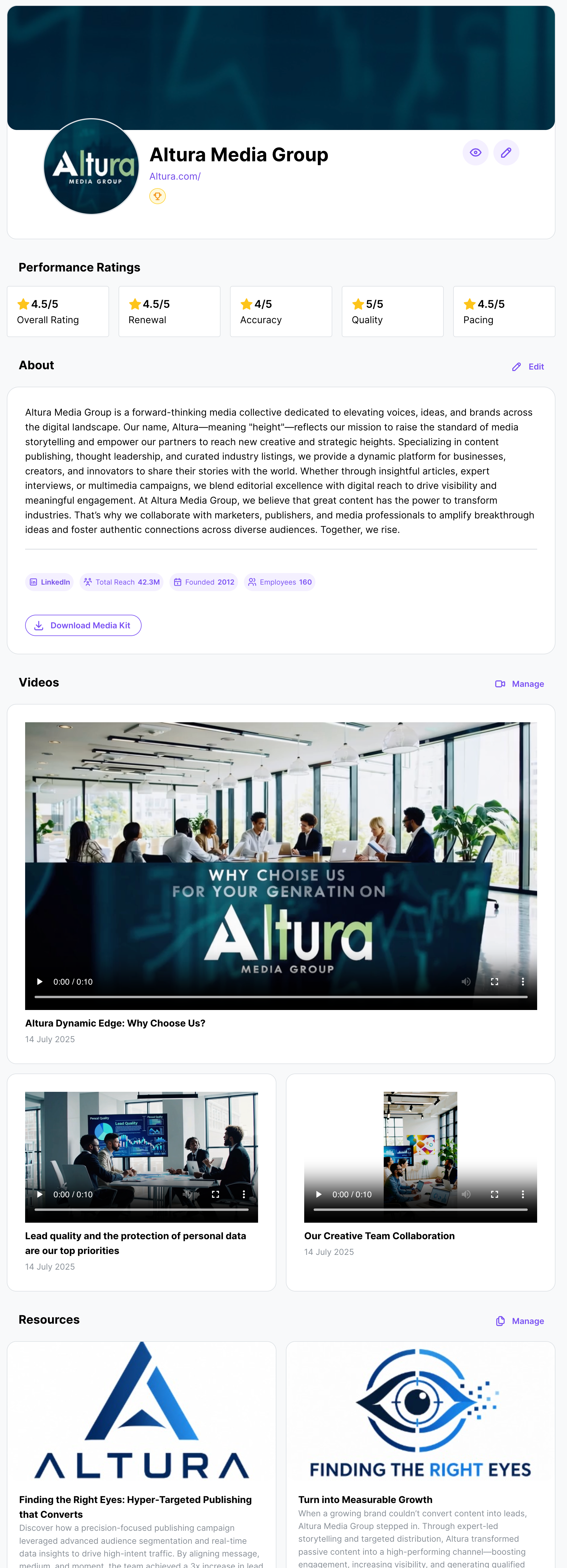
Making your Spotlight page convincing
Buyers want facts, not marketing language. Specifically, they want to know:
Industries you own. Be explicit. "B2B technology professionals in North America" is more useful than "business professionals." If you're especially strong in cloud infrastructure, cybersecurity, or financial services, say so directly in your About field.
Data capabilities. If you capture consent-based first-party data, run intent-driven content programs, or have unusually high engagement in certain job functions or company sizes, write it down. Buyers paying premium CPEs want to know why your leads are worth more.
Proof from past campaigns. Use the Resources section (Earner) to attach case studies showing real delivery results: lead volumes, acceptance rates, TAL match rates, or campaign completion. This is what sets you apart from a bare profile.
Tip: Preview before publishing. Use the preview on your Spotlight page to see how it reads to a buyer before your next campaign cycle. Buyers see it during RFP evaluation and while browsing the Private Marketplace.